The Xcode 26 System Prompts collection contains a couple of chat templates, but more interestingly: typical LLM-targeted documentation of new-ish technology to prime their context for stuff that’s not well-represented in training data.
Avoiding heap allocations and reference counting overhead
Collections that are modified in place but rarely copied
Embedded systems or low-level programming
Not suitable for:
Collections that need to grow or shrink
Collections that benefit from copy-on-write semantics
Collections that are frequently copied or shared between variables
That is a very good summary that is painfully absent on the InlineArray API docs. As a Swift veteran, you usually look for a Swift Evolution proposal for the new tech then an try to find out there what this is all about.
Which is to say: I don’t mind quick summaries for busy developers like these!
These documents are probably not written by a human, or team of humans, because of inconsistent tone and all. So I’d wager they were LLM-generated themselves. I do hope they were edited for misinformation at least!
If you use agentic coding tools, it’s sensible to copy Apple’s docs into your setup. For Claude Code, you’d drop these into a docs/ folder somewhere to look up, but then you need an index to tell Claude to look there. Per project, that can get repetitive, and as a global setting, it can pollute your context. So maybe a clever solution would be to use ‘formalized’ Skills like Antoine van der Lee’s SwiftUI Expert Skill that is available in Claude Code as a plugin to bundle everything.
The clang compiler support YAML module annotations so you don’t have to own and modify .h files;
The SWIFT_NAME annotation can be used to make free C functions act like methods on objects;
You can tell the compiler to generate object types for automatic reference counting instead of dealing with opaque pointers.
Until today, I was under the impression that you can make C functions sound a little bit nicer and add argument labels with SWIFT_NAME mostly, but this is something on a different level.
One Example to turn a free function into a method:[#20260123webgpu][]
That’s what got me interested: object-oriented conventions from C, expressed in Swift’s notation! Where does the type come from? Usually, you just get opaque pointers.
The WGPUQueueImpl typealias is generated as well with a different annotation – that’s now becoming a reference-counting wrapper around WGPUQueue instead of an opaque pointer. The heavy lifting of this is done by a parameterized annotation, SWIFT_SHARED_REFERENCE(increment, decrement), to which you pass function names to increment and decrement the refcount.
The annotation, if you would apply it manually in the header, would look like this:
// Original typedef is:// typedef struct WGPUQueueImpl* WGPUQueue WGPU_OBJECT_ATTRIBUTE;typedefstructSWIFT_SHARED_REFERENCE(wgpuGroupAddRef,wgpuGroupRelease)WGPUQueueImpl*WGPUQueueWGPU_OBJECT_ATTRIBUTE;
… making the generated Swift interface:
// Original generated typealias would've been:// public typealias WGPUGroup = OpaquePointerpublicclassWGPUGroupImpl{}publictypealiasWGPUGroup=WGPUGroupImpl
Now the secret ingredient to make this bearable is to not copy the header files, but to use a YAML “sidecar” file to instruct clang to generate a different API. Combining the generated type declaration and the method example from above:
clang supports API notes in a YAML file to annotate .h files without having to change the .h files themselves for module imports. That’s so neat: with that you can wrap C libraries in Swift without having to maintain a copy of the headers.
API notes are found under the name “Foo.apinotes” for a module named “Foo”.
Private module map API notes are picked up as well: “Foo_private.apinotes”
Depending on the C API, this can be a game-changer in terms of Swift language ergonomics for you and your team. No more manual refcounting (which, if limited to e.g. a function scope, isn’t that bad thanks to defer, but can get hairy when you need to escape and keep references alive for longer), proper Swift types instead of opaque pointers, and methods and properties on these types instead of namespaced free functions. Lovely.
Xcode 26 introduced a bug where for some people, me included, Metal shaders won’t compile because the Metal toolchain won’t be managed by Xcode properly, no matter how often you reinstall the toolchain. Some fixes include moving the toolchain into a folder Xcode can see without having to mount anything. Others replace the ExportMetadata.plist exposed version.
So that I don’t forget to do this after rebooting, I wrote a Launch Service that does this after reboot, when /Volumes/ changes, and every 5min for good measure :)
My Xcode 26.2 still suffers from an inability to compile Metal shader files because it can’t find the Metal toolchain: error: cannot execute tool ‘metal’ due to missing Metal Toolchain; use: xcodebuild -downloadComponent MetalToolchain That command also doesn’t do anything to fix this for me. But I did have success mounting the .dmg file with the toolchain manually.
Welcome to 2026, and a new year of Emacs Blog Carnival post! To start the Gregorian calendar year fresh, the blogging/writing/thinking prompt of this month is: This year, I’ll … What will you do differently in Emacs this year? Or will you just get started? Why? What are you excited about to explore and tinker with? What do you want to perfect?
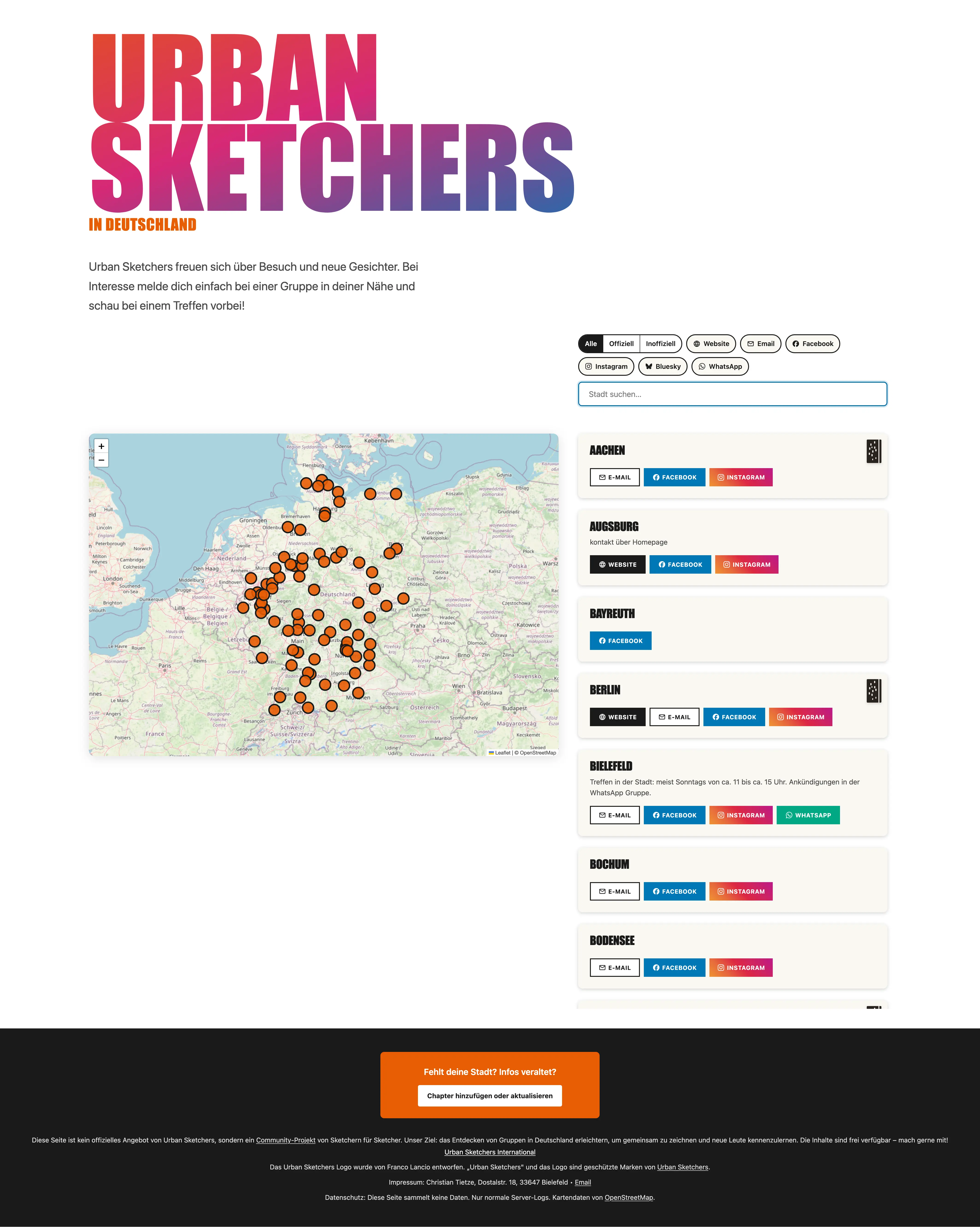
Happy 2026! Let’s start the year with something fun. The internet shortly became the place of love and joy and sharing that I remember it for: a volunteer who found all (?) Urban Sketching groups in Germany, official and unofficial, reached out to me to send social media links and contact details he found so I include them on the spartan overview page I maintained.